


Online Barcode Reader from Screenshot & PDF: Scan 1D and 2D Barcodes Without Hardware
A comprehensive technical masterclass on decoding 1D linear barcodes (UPC-A, EAN-13, Code 128, Code 39) and 2D matrices from digital screenshots, cropped invoices, and multi-page PDF documents without handheld laser scanners.
Step-by-Step Visual Tutorial Available
Want interactive visual diagrams and print sizing formulas? Check out our visual guide.
Current dashboard · Updated October 8, 2026
Choose type → Add content → Design & publish
- 1. Choose typeUse the category filters, select an available QR type, then choose Static or Dynamic where supported. Type availability and paid features depend on your plan and administrator settings.
- 2. Add contentFill in the required fields and check the live preview. Dynamic pages use the available default layouts and appearance controls; a custom landing-page builder is not currently available.
- 3. Design & publishUse Frame, Shape, Corners, Logo, Templates and Security. Static codes are download-only. Publish a dynamic code before its PNG/SVG downloads unlock.
Use Next to validate each stage; the step bar cannot skip unfinished stages. Going back preserves your work on this page. Changing type prompts for a reset only after you have modified the content.
After publishing, open My QR codes: search, filter, switch Grid/List, and open Edit. Content Payload and Appearance change the hosted page; QR Matrix & Frames changes the code artwork. Save updates and test the existing printed code. Static downloads do not appear in this library or scan analytics.
The public tools combine content and styling on one workspace. The three-stage navigation above describes the signed-in dashboard, not the scanner or the standalone barcode tool.
To read a 1D or 2D barcode from a screenshot or PDF document online, zoom into the PDF or document to at least 150–200% resolution, capture a clean crop of the barcode lines using your system snipping tool (Win + Shift + S on Windows or Cmd + Ctrl + Shift + 4 on Mac), and paste (Ctrl + V) directly into the Online Barcode & QR Scanner. The client-side computer vision engine analyzes the scanlines and decodes linear barcodes (UPC-A, EAN-13, Code 128, Code 39) and 2D matrices (Data Matrix, PDF417, QR) with zero cloud file uploads.
In today's digitized business and commerce ecosystem, billions of physical packages, retail items, pharmaceuticals, and manufacturing components are indexed using linear 1D barcodes and 2D matrix symbologies. However, an increasingly massive portion of these barcodes never pass under a physical cash register laser beam. Instead, they live trapped inside digital files: electronic bills of lading (BOL), Amazon return authorization slips, FedEx and UPS shipping labels, PDF commercial invoices, event e-tickets, and inventory warehouse receipts.
When an office worker, eCommerce merchant, supply chain coordinator, or consumer receives a PDF document containing a barcode, they face a bizarre technical conundrum. How do you "scan" a barcode that is trapped inside a digital file on your computer without printing it out on physical paper or buying an expensive USB handheld laser barcode scanner?
You do not need to print the file, and you do not need dedicated hardware. Using modern in-browser computer vision pipelines powered by WebAssembly, you can decode virtually any standard barcode directly from a digital screenshot, pasted image, or PDF document in fractions of a second. In this definitive guide, we will break down the underlying mathematics of linear and 2D symbologies, explore how computer vision algorithms reconstruct barcode scanlines, provide step-by-step instructions for extracting codes from PDFs, and show you how to generate enterprise-grade vector barcodes for your own products.
1. The Barcode Symbology Spectrum: 1D Linear vs. 2D Matrix Codes
To successfully extract and decode barcodes from digital images, one must first understand what type of barcode you are dealing with. Barcode symbologies belong to two distinct geometric families:
Parallel Bars & Variable Spaces
One-dimensional barcodes encode information along a single horizontal axis using alternating dark bars and light spaces of varying widths. They typically store between 8 and 30 alphanumeric characters.
- UPC-A / UPC-E: 12-digit standard retail barcodes across North America.
- EAN-13 / EAN-8: 13-digit global retail trade item numbering (GTIN).
- Code 128: High-density alphanumeric barcode used worldwide in logistics and shipping.
- Code 39: Industrial symbology used by defense, automotive, and healthcare sectors.
- ITF (Interleaved 2 of 5): Encodes pairs of digits on corrugated shipping boxes.
Geometric Grids & High-Density Payloads
Two-dimensional barcodes encode data horizontally and vertically in checkerboard grids of square or circular modules. They can store up to several thousand bytes of data.
- QR Code (Quick Response): ISO/IEC 18004 matrix with 3 finder patterns; holds up to 7,089 numeric chars.
- Data Matrix: ISO/IEC 16022 compact L-shaped border matrix used on tiny electronics and surgical tools.
- PDF417: Stacked linear symbology used on airline boarding passes and government driver's licenses.
- Aztec Code: Matrix with a central bulls-eye finder pattern; common on rail tickets.
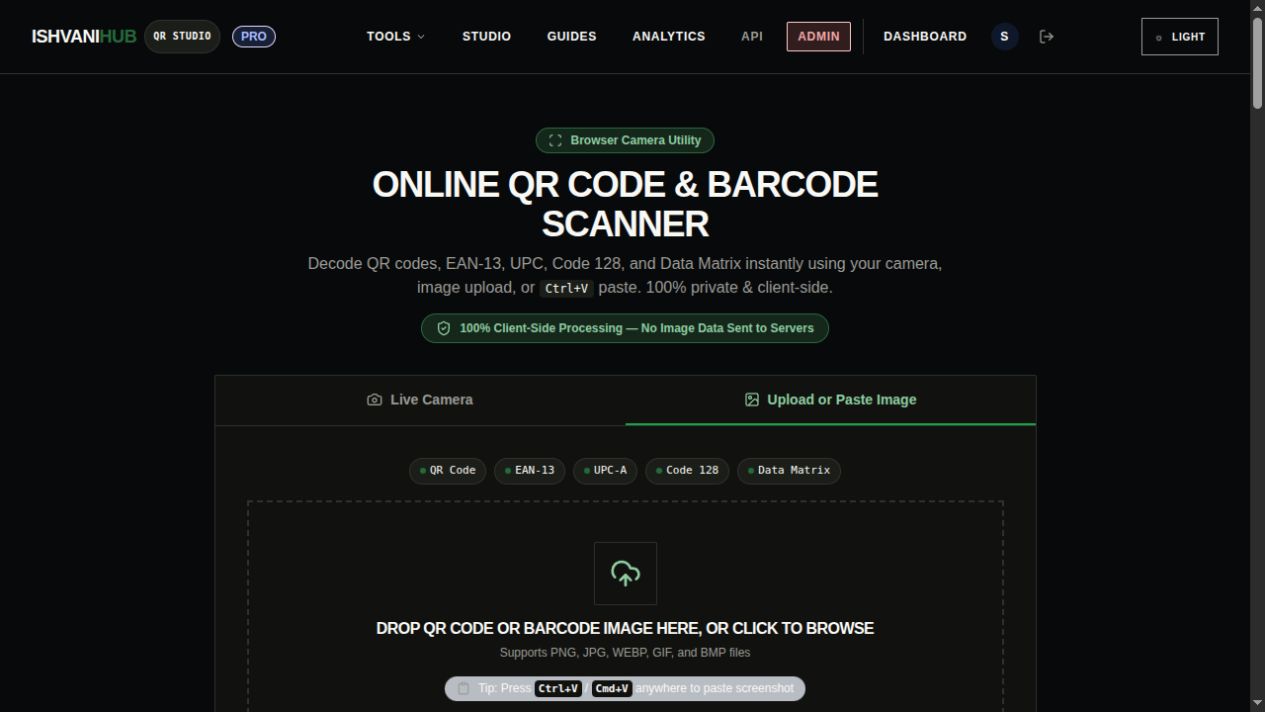
The online scanner detects and decodes both 1D retail barcodes and 2D QR matrices simultaneously.
2. The Physics of In-Browser Computer Vision: How Pixels Become Data
Physical laser barcode scanners work by sweeping a focused beam of red diode light horizontally across the bars. A photodiode measures the intensity of light reflected back: dark bars absorb the light (producing low electrical current), while white spaces reflect the light (producing high current). The hardware measures the timing pulse duration to calculate bar widths.
When decoding a digital screenshot or PDF image on a computer, there is no laser beam. Instead, our software replicates the laser physics through a multi-stage computer vision image processing pipeline executing locally inside your web browser via WebAssembly:
1 Luminance Binarization & Grayscale Normalization
The pasted RGB screenshot is converted into an 8-bit single-channel grayscale buffer using the standard luminosity formula: Y = 0.299R + 0.587G + 0.114B. If the image has low contrast or background tint, an adaptive thresholding algorithm (such as Otsu's binarization) determines the mathematical threshold separating foreground bars from background space.
2 Virtual Scanline Probing
The decoder projects multiple horizontal, diagonal, and cross-sectional "virtual scanlines" across the 2D pixel array. Along each scanline, it measures the exact run-length of continuous dark pixels versus continuous light pixels.
3 Guard Pattern Synchronization
For 1D barcodes like EAN-13 and UPC-A, the algorithm searches for the Start Guard Pattern (1-0-1), the Center Guard Pattern (0-1-0-1-0), and the Stop Guard Pattern (1-0-1). These patterns define the exact modular unit width (the single "X-dimension") of the barcode and allow the software to compensate for image scaling, perspective tilt, or non-uniform stretching.
4 Parity Verification & Modulo Checksum Calculation
Once characters are decoded from the modular ratios, the algorithm executes strict mathematical checksum verification. In EAN-13, for example, the 13th digit is a Modulo-10 checksum calculated by multiplying odd-positioned digits by 1 and even-positioned digits by 3. If the calculated checksum does not match the final digit, the result is rejected as a misread. This mathematical guarantee prevents false positive scans.
3. Step-by-Step Guide: How to Scan Barcodes from Screenshots
Capturing a barcode off your screen requires less than five seconds when you use your operating system's native clipboard integration:
Trigger Your Desktop Snipping Tool
On Windows 11 or 10, press Win + Shift + S.
On macOS, press Cmd + Ctrl + Shift + 4 (copies selection straight to clipboard memory).
On Linux, press Shift + PrintScreen.
Capture the Complete Barcode with Quiet Zones
Draw your selection rectangle completely around the barcode. Crucial rule: Ensure you include at least a quarter-inch of white/blank space to the left and right of the vertical bars. Linear barcodes require horizontal Quiet Zones to identify where the guard patterns begin.
Paste Directly into the Web Scanner (Ctrl + V / Cmd + V)
Navigate to the Online Barcode & QR Scanner in your browser and press Ctrl + V or Cmd + V. The tool immediately ingests the image from your clipboard, highlights the detected barcode bounding box, and displays the decoded numbers.
Inspect or Search Product Information
Once decoded, click "Search Google" or "Search Amazon" to look up the product identity, or copy the tracking number directly into your shipment management software.
4. How to Extract and Read Barcodes from Multi-Page PDF Documents
PDF files are ubiquitous in corporate supply chains. Invoices from suppliers, shipping manifests, customs declarations, and warehouse packing slips frequently contain barcodes rendered at varying resolutions.
Follow these two best-practice methods to read barcodes from PDFs:
Method 1: The "Zoom to 200%" Snip Technique (Fastest & Most Reliable)
When a PDF viewer (such as Adobe Acrobat Reader, Apple Preview, or Google Chrome PDF Viewer) renders a document at 100% scale on a standard 1080p laptop display, the thin vertical bars of a Code 128 or UPC barcode may only measure 1 or 2 screen pixels wide. At that low resolution, subpixel anti-aliasing can cause adjacent black bars to blend together into a muddy gray stripe.
The Pro Tip: Zoom In Before Snipping
Before taking your screenshot, use your PDF viewer's zoom controls (Ctrl + Plus or Cmd + Plus) to enlarge the document to 150%, 200%, or 300%. This forces the vector PDF rendering engine to rasterize the barcode bars using 3 to 6 discrete pixels per module. Once enlarged, snip the barcode and paste it into the scanner. It will decode instantly with 100% accuracy.
Method 2: Convert PDF Page to Image for Batch Scanning
If you have a multi-page PDF document or an automated workflow where manual snipping is impractical:
- Export the target PDF page as a high-resolution PNG or JPEG file (at 300 DPI) using Adobe Acrobat or an open-source tool like
pdftoppm -png -r 300 document.pdf page. - Drag and drop the exported image directly into the Ishvanihub Scanner file upload zone.
- The scanner automatically analyzes the entire image canvas and isolates any valid barcode patterns detected.
5. Symbology Reference Matrix: Common Barcode Formats & Their Decoded Outputs
Understanding what your decoded barcode number represents allows you to route data effectively into inventory and database systems:
| Symbology | Format Type | Character Capacity | Primary Industry / Use Case | Decoded Data Example |
|---|---|---|---|---|
| UPC-A | 1D Linear | 12 Digits | US & Canadian Retail Groceries & Consumer Goods | 012345678905 |
| EAN-13 | 1D Linear | 13 Digits | International Retail Trade Items (GTIN-13) | 5901234123457 |
| Code 128 | 1D Linear | Variable (128 ASCII) | FedEx/UPS Shipping Labels, Warehousing, Serial Numbers | 1Z9999999999999999 |
| Code 39 | 1D Linear | Variable (43 Alphanumeric) | Automotive VINs, US Department of Defense (MIL-STD) | PART-NO-84920 |
| QR Code | 2D Matrix | Up to 7,089 Characters | Web Links, Digital Menus, Contact Cards, Payments | https://qrgenerator.ishvanihub.com |
| Data Matrix | 2D Matrix | Up to 2,335 Characters | Laser-etched Microelectronics, Pharmaceuticals (GS1) | 0100850000000001 |
6. Product Lookup & Inventory Verification: What to Do with Decoded Barcodes
When you scan a 1D linear barcode like UPC-A or EAN-13, the decoder outputs a pure string of numbers (for example, 049000050103). By itself, this number does not contain a product name or image. It is an index key pointing to the Global Trade Item Number (GTIN) database managed by GS1.
In our scanner result box, we have integrated dynamic contextual action buttons to streamline your lookup workflow:
- One-Click Google Product Search: Clicking the "Search Google" button automatically opens an external query for the decoded GTIN or UPC number. This allows you to verify the manufacturer name, retail pricing, packaging variants, and authentic brand identity in seconds.
- One-Click Amazon Catalog Search: If the decoded string represents an ASIN or retail trade item, you can cross-reference customer reviews, current inventory levels, and product availability directly on Amazon.
- Copy to Clipboard for ERP / WMS Ingestion: Warehouse coordinators and inventory clerks can hit Copy to Clipboard and paste the sanitized barcode number directly into enterprise inventory systems like SAP, NetSuite, Shopify, or QuickBooks.
7. Troubleshooting: Why Digital Barcodes Fail to Scan and How to Fix Them
Digital barcodes extracted from scanned paper PDFs, email screenshots, or low-resolution web pages can occasionally fail to decode. Here are the 4 most frequent causes and their solutions:
1. Compression Artifacts from JPEG Lossy Formats
If a PDF was generated by scanning paper documents through an office multifunction copier using aggressive JPEG compression, discrete "ringing artifacts" (compression halos) appear around the vertical black bars. These artifacts blur the bar edges and distort the width ratios. Fix: When scanning physical documents, select TIFF or lossless PNG output, or set the copier compression quality to 100%.
2. Missing Left/Right Quiet Zones
Linear barcodes cannot be read without clear horizontal margins on both ends. If your crop cuts off even a single millimeter of white space next to the outer start or stop guard bars, the algorithm cannot calculate the baseline threshold. Fix: Ensure at least 10X the narrow bar width of clear white space is included in your snip.
3. Skewed or Rotated Angle Exceeding 45 Degrees
While 2D QR codes feature three omnidirectional corner finder patterns allowing scans at any 360-degree rotation, 1D linear barcodes require the virtual scanlines to cross all bars simultaneously. If a document scan is tilted at an awkward angle, virtual horizontal scanlines miss the bottom or top of the bars. Fix: Rotate the PDF page right-side-up before snipping.
4. Subpixel Module Erosion (Screen Downsampling)
When an application scales down an image to fit a small preview window, the operating system drops every second or third pixel column. If a thin black bar falls on a dropped column, that bar disappears completely from the screenshot. Fix: Always view the document at 100% or 200% actual size before capturing.
8. The Creator Funnel: From Scanning Barcodes to Generating Modern 2D QR Codes
Many businesses and online sellers begin by reading legacy 1D barcodes from distributor catalogs or supplier invoices, but quickly realize that traditional 1D barcodes have severe limitations in modern marketing and consumer engagement:
- 1D barcodes can only hold a dozen numbers—they cannot link to a website, display a PDF user manual, or connect a customer to support.
- 1D barcodes require specialized optical laser scanners or camera OCR apps, whereas QR codes scan natively on any modern smartphone camera with zero apps required.
- 1D barcodes take up massive horizontal real estate on packaging, while 2D QR codes pack 50 times more data into a compact, aesthetic square.
Upgrade Your Inventory Collateral to Permanent Branded QR Codes
Whether you are printing product packaging labels, Amazon insert cards, warehouse bin tags, or retail table tents, our Custom QR Code Generator with Logo allows you to bridge your product identifiers with rich digital destinations.
Download infinite-resolution vector SVG files for laser engravers, flexographic label presses, and offset carton printing. Razor-sharp edges guarantee zero scanning failures.
Our static QR codes are 100% free forever without subscriptions, 14-day trial expirations, or scan limits. Your codes remain permanently scannable for the lifetime of your printed packaging.
Frequently Asked Questions (People Also Ask)
Can this online scanner read barcodes directly from locked or password-protected PDF files?
Yes! Because you use your operating system's screen snipping shortcut (Win + Shift + S or Cmd + Shift + 4) to capture the barcode as displayed on your screen, it does not matter if the underlying PDF has permissions restricting editing, printing, or text extraction. As long as you can view the barcode on your monitor, you can snip and decode it.
What barcode symbology do shipping carriers like FedEx, UPS, and USPS use?
Major shipping carriers primarily use Code 128 (GS1-128) for their primary tracking numbers because it can encode alphanumeric strings with high data density. For international routing and automated sorting, many carriers also include 2D symbologies such as MaxiCode (a honeycomb matrix with a central bullseye used by UPS) or Data Matrix. Our scanner natively parses Code 128, Data Matrix, and QR codes.
Is my uploaded invoice or screenshot saved on your web servers?
No, never. Our scanner operates entirely on client-side WebAssembly technology running inside your own browser tab. When you paste an image, the pixel data is analyzed strictly in your local device memory. At no point is your invoice, shipping label, or confidential document transmitted to our cloud servers or stored in any database.
Can I read multiple barcodes from a single document image?
When an image contains multiple barcodes side-by-side (such as a retail packaging carton featuring both a UPC barcode and a QR code), we recommend snipping each barcode individually using your desktop selection tool. This allows the computer vision engine to focus its thresholding and scanline algorithms precisely on each specific code without ambiguity.
How do I convert a decoded barcode into a scannable QR code?
Once our scanner decodes your barcode, simply click the "Generate Similar QR Code" button in the result box. This automatically passes the decoded GTIN or serial number into our Free QR Studio, allowing you to instantly generate a clean, modern QR code that any smartphone camera can scan without hardware.
Why did my 1D barcode scan fail even though the image looks clear to my eyes?
Human eyes can easily interpolate patterns across blurry lines, but mathematical decoders require exact modular width ratios (1X, 2X, 3X, 4X). If a barcode screenshot lacks sufficient pixel resolution (e.g., the narrowest bar is less than 1.5 pixels wide) or if the white quiet zone margins were cropped off, the mathematical checksum algorithm will reject the read. Zooming in to 200% before snipping resolves 99% of reading failures.
Can I generate vector barcodes and QR codes for my own products for free?
Yes! On QR Generator Ishvanihub, all static generation is 100% free and permanent with zero scan limits and zero subscriptions. You can design custom barcodes and QR codes with logos, custom dot shapes, and branded frames, and download print-ready vector SVG files ready for commercial packaging presses.
Decode Your Barcode or Build a Branded QR Code Today
Scan any 1D barcode or 2D QR matrix instantly from screenshots, PDFs, or photos with zero server uploads, or upgrade your product labeling with permanent vector QR codes.
Ready to Create Your Custom QR Code?
Start generating scannable QR codes with custom colors, company logo, and lossless vector SVG export in seconds.